WebTop-5: Customize the font list in the HTML editor
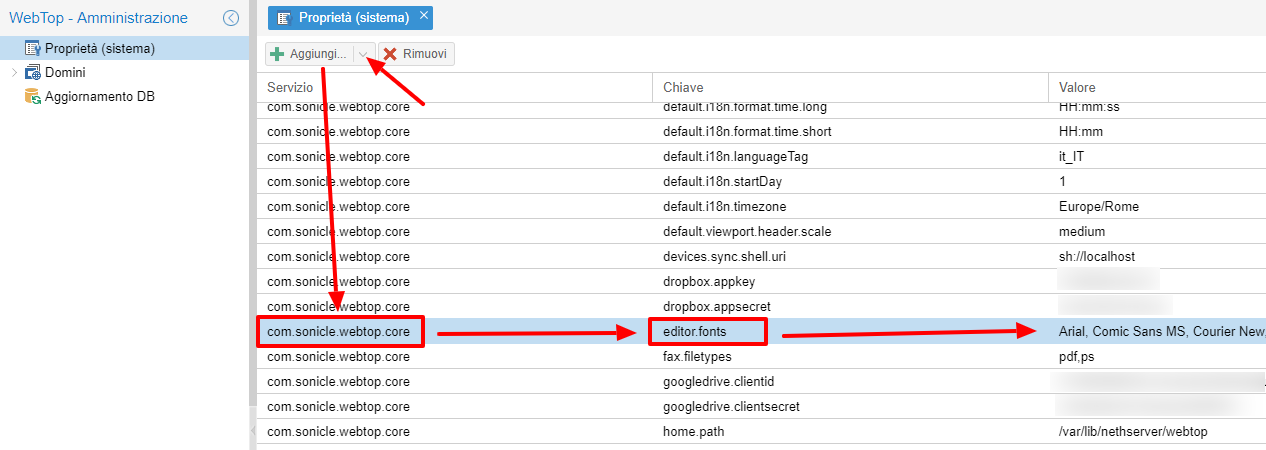
You can change the list of fonts available in every HTML editor by adding a global setting in the admin panel.
Use the com.sonicle.webtop.core service and set the key editor.fonts.
Adding this setting replaces the default list, so include the default fonts too if you still want them:
Arial, Comic Sans MS, Courier New, Helvetica, Tahoma, Times New Roman, Verdana
Font names must be separated by commas.
From the shell, run:
su - postgres -c 'psql webtop5'
Then insert the custom font list:
INSERT INTO "core"."settings" ("service_id", "key", "value")
VALUES ('com.sonicle.webtop.core', 'editor.fonts', 'Arial,Font,Comic Sans MS,Courier New,Helvetica,Tahoma,Times New Roman,Verdana');
You can also customize the available font sizes with the editor.fontsizes key.